您现在的位置是:首页 >学无止境 >微信小程序 标记展示在地图区域中网站首页学无止境
微信小程序 标记展示在地图区域中
简介微信小程序 标记展示在地图区域中
展示:
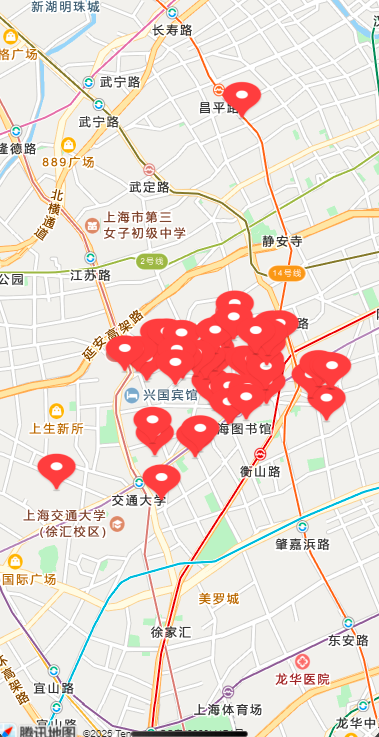
解决方案:
- 将获取的标记添加到
markers数组中。 - 通过
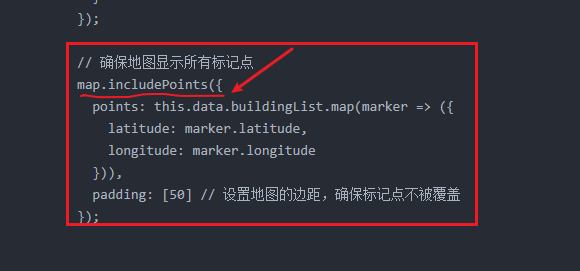
map.includePoints()方法确保所有标记都显示在地图区域内。 - 确保每个标记包含必要的信息,如经纬度、图标路径、宽高等。
js:
// pages/map/map.js
const QQMapWX = require('../../libs/qqmap-wx-jssdk.js');  // 使用 require 代替 import
const config = require('../../utils/config.js');

// 实例化腾讯地图API
const qqmapsdk = new QQMapWX({
  key: config.qqmapsdkkey
});

Page({
  data: {
    buildingList: [],    // 存储建筑物列表
    map: null, // 用来存储地图实例
  },

  onReady() {
    // 获取地图组件实例
    const map = wx.createMapContext('map');
    this.setData({
      map: map,
    });

    // 初始化地图
    this.initMap(map);
  },

  initMap(map) {
    wx.request({
      url: `${config.BASE_URL}/building/hobby/list?pageNum=1&pageSize=50`,
      method: 'GET',
      success: (res) => {
        if (res.data.code === 200) {
          const newData = res.data.rows.map(item => ({
            ...item,
            id: item.hobbyId,
            title: item.currentName,
            pic: config.BASE_URL + item.pic, // 拼接图片完整路径
            latitude: item.latitude, // 假设你有纬度字段
            longitude: item.longitude, // 假设你有经度字段
            iconPath: '/resources/marker-icon.png', // 自定义图标路径
            width: 40, // 自定义图标的宽度
            height: 40, // 自定义图标的高度
          }));

          // 更新数据
          this.setData({
            buildingList: this.data.buildingList.concat(newData), // 合并新数据
          });

          // 设置地图标记
          map.addMarkers({
            markers: this.data.buildingList, // 使用 this.data.buildingList 获取数据
            success: function () {
              console.log("Markers added successfully.");
            },
            fail: function () {
              console.log("Failed to add markers.");
            }
          });

          // 确保地图显示所有标记点
          map.includePoints({
            points: this.data.buildingList.map(marker => ({
              latitude: marker.latitude,
              longitude: marker.longitude
            })),
            padding: [50] // 设置地图的边距,确保标记点不被覆盖
          });


        } else {
          wx.showToast({
            title: '数据加载失败',
            icon: 'none',
          });
        }
      },
      fail: () => {
        wx.showToast({
          title: '请求失败',
          icon: 'none',
        });
      },
      complete: () => {
        this.setData({
          isLoading: false, // 加载完成,解除加载中状态
        });
      },
    });
  },
});
wxml:
<view class="container">
  <!-- 地图组件 -->
  <map id="map"   scale="14" style="width: 100%; height: 100vh;" />
</view>
解释:
风语者!平时喜欢研究各种技术,目前在从事后端开发工作,热爱生活、热爱工作。




站长推荐
- QT多线程的5种用法,通过使用线程解决UI主界面的耗时操作代码,防止界面卡死。
 QT多线程的5种用法,通过使用线程解决UI主界面的耗时操作代码,防止界面卡死。...
 - U8W/U8W-Mini使用与常见问题解决
 U8W/U8W-Mini使用与常见问题解决
 - stm32使用HAL库配置串口中断收发数据(保姆级教程)
 stm32使用HAL库配置串口中断收发数据(保姆级教程)
 - 分享几个国内免费的ChatGPT镜像网址(亲测有效)
 分享几个国内免费的ChatGPT镜像网址(亲测有效)
 - Allegro16.6差分等长设置及走线总结
 Allegro16.6差分等长设置及走线总结