您现在的位置是:首页 >技术教程 >python:用deepseek来实现一段烟花代码网站首页技术教程
python:用deepseek来实现一段烟花代码
简介python:用deepseek来实现一段烟花代码
一.要实现一个绚丽的烟花效果,并且可以添加文字,可用 pygame 库。pygame 是一个用于编写游戏的 Python 库,非常适合用来创建图形效果。
二.以下是一个简单的烟花效果的实现,并且可以在屏幕上添加文字:
import pygame
import random
import math

# 初始化pygame
pygame.init()

# 设置屏幕大小
screen_width = 800
screen_height = 600
screen = pygame.display.set_mode((screen_width, screen_height))
pygame.display.set_caption("绚丽烟花")

# 定义颜色
BLACK = (0, 0, 0)
WHITE = (255, 255, 255)
COLORS = [(255, 0, 0), (0, 255, 0), (0, 0, 255), (255, 255, 0), (255, 0, 255), (0, 255, 255)]

# 定义烟花的粒子类
class Particle:
    def __init__(self, x, y, color):
        self.x = x
        self.y = y
        self.color = color
        self.radius = random.randint(2, 4)
        self.angle = random.uniform(0, 2 * math.pi)
        self.speed = random.uniform(1, 5)
        self.life = random.randint(20, 40)

    def move(self):
        self.x += math.cos(self.angle) * self.speed
        self.y += math.sin(self.angle) * self.speed
        self.life -= 1

    def draw(self):
        pygame.draw.circle(screen, self.color, (int(self.x), int(self.y)), self.radius)

# 定义烟花类
class Firework:
    def __init__(self):
        self.x = random.randint(0, screen_width)
        self.y = screen_height
        self.color = random.choice(COLORS)
        self.particles = []
        self.exploded = False

    def explode(self):
        for _ in range(100):
            self.particles.append(Particle(self.x, self.y, self.color))
        self.exploded = True

    def move(self):
        if not self.exploded:
            self.y -= 5
            if self.y <= random.randint(100, 300):
                self.explode()
        else:
            for particle in self.particles:
                particle.move()

    def draw(self):
        if not self.exploded:
            pygame.draw.circle(screen, self.color, (int(self.x), int(self.y)), 5)
        else:
            for particle in self.particles:
                particle.draw()

# 创建烟花列表
fireworks = []

# 添加文字
font = pygame.font.SysFont("arial", 48)

# 主循环
running = True
clock = pygame.time.Clock()

while running:
    screen.fill(BLACK)

    # 处理事件
    for event in pygame.event.get():
        if event.type == pygame.QUIT:
            running = False

    # 添加新的烟花
    if random.randint(0, 100) < 5:
        fireworks.append(Firework())

    # 更新和绘制烟花
    for firework in fireworks:
        firework.move()
        firework.draw()

    # 移除已经消失的烟花
    fireworks = [firework for firework in fireworks if not firework.exploded or any(particle.life > 0 for particle in firework.particles)]

    # 添加文字
    text = font.render("Happy Valentine's Day!", True, WHITE)
    screen.blit(text, (screen_width // 2 - text.get_width() // 2, screen_height - 100))

    # 更新屏幕
    pygame.display.flip()
    clock.tick(30)

# 退出pygame
pygame.quit()
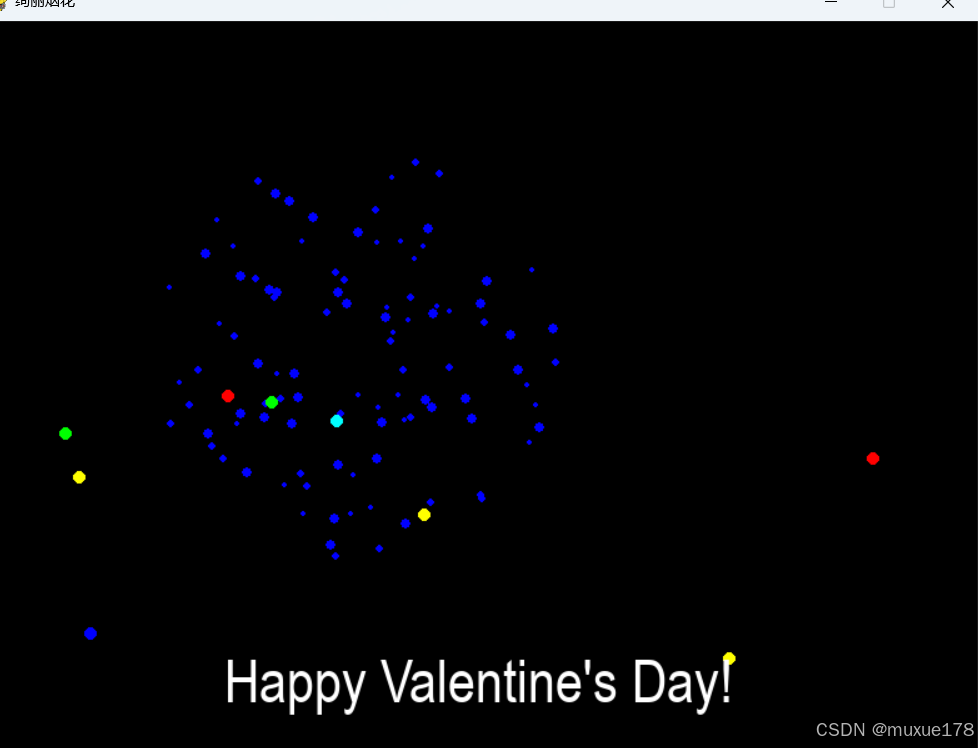
三.效果:
风语者!平时喜欢研究各种技术,目前在从事后端开发工作,热爱生活、热爱工作。





站长推荐
- QT多线程的5种用法,通过使用线程解决UI主界面的耗时操作代码,防止界面卡死。
 QT多线程的5种用法,通过使用线程解决UI主界面的耗时操作代码,防止界面卡死。...
 - U8W/U8W-Mini使用与常见问题解决
 U8W/U8W-Mini使用与常见问题解决
 - stm32使用HAL库配置串口中断收发数据(保姆级教程)
 stm32使用HAL库配置串口中断收发数据(保姆级教程)
 - 分享几个国内免费的ChatGPT镜像网址(亲测有效)
 分享几个国内免费的ChatGPT镜像网址(亲测有效)
 - Allegro16.6差分等长设置及走线总结
 Allegro16.6差分等长设置及走线总结