您现在的位置是:首页 >技术交流 >kkFileView二开之Excel转pdf接口网站首页技术交流
kkFileView二开之Excel转pdf接口
kkFileView二开之Excel转pdf接口
1 kkFileView源码下载及编译
前文 【kkFileView二开之源码编译及部署】 已完成了kkFileView源码二开的基础准备。
2 Excel转pdf接口
2.1 背景
在实际工作过程中,会有系统针对Excel模板填充,并转换为pdf的需求。
2.2 分析
在转换过程中会存在多种方式,一种是直接传入文件流,进行转换,另外一种是传入文件链接地址,进行转换,因此提供两个接口,用于支持以上两种情况。考虑到Excel中,会有多个Sheet的,但是至需要转换其中一个或多个Sheet的情况,因此还提供一个sheet序号的参数,如果配置了,则仅转换指定sheet,如果未传入,则进行全部转换。
2.2 接口开发
前文【kkFileView二开之word转pdf接口】实现了Word转pdf的接口,Excel转pdf的接口和word转pdf接口底层调用方法均一致,唯一需要单独增加的是针对指定Sheet的转换。针对指定Sheet转换的逻辑也比较简单,就是将传入的Excel进行二次处理,保留需要转换的Sheet,针对不需要的Sheet,从Excel中进行删除即可。
2.2.1 引入hutools
在pom文件夹,
<dependency>
     <groupId>cn.hutool</groupId>
     <artifactId>hutool-all</artifactId>
     <version>5.8.16</version>
 </dependency>
2.2.2 编写ExcelSheet处理方法
在cn.keking.utils.OfficeUtils.java类中,新增readSheetByIndex方法
 /**
     * 读取指定下标的Sheet
     * @param filePath
     * @param indexs
     * @throws Exception
     */
    public static String readSheetByIndex(String filePath, List<Integer> indexs) throws Exception{
        if(null == indexs || indexs.isEmpty()){
            return filePath;
        }
        //非Excel,直接返回
        if(!Arrays.asList("xls","xlsx").contains(FileUtil.getSuffix(filePath))){
            return filePath;
        }
        FileInputStream fis = new FileInputStream(filePath);
        XSSFWorkbook workbook = new XSSFWorkbook(fis);
        int numberOfSheets = workbook.getNumberOfSheets();
        Optional<Integer> maxIndex = indexs.stream().max(Integer::compareTo);
        if(maxIndex.isPresent() && maxIndex.get()> numberOfSheets){
            throw new Exception("copy的sheet["+maxIndex+"]最大下标大于sheet总数["+numberOfSheets+"]");
        }
        //倒序移除,避免下标越界
        for (int i = numberOfSheets-1; i >=0 ; i--) {
            if(!indexs.contains(i+1)){
                workbook.removeSheetAt(i);
            }
        }
        File copy = FileUtil.createTempFile("copy_", ".xlsx", true);
        workbook.write(Files.newOutputStream(copy.toPath()));
        fis.close();
        return copy.getPath();
    }
2.2.3 编写转换接口
在cn.keking.web.controller包下,新增ConvertController.java 文件
package cn.keking.web.controller;

import cn.hutool.core.convert.Convert;
import cn.keking.config.ConfigConstants;
import cn.keking.model.FileAttribute;
import cn.keking.model.FileType;
import cn.keking.model.ReturnResponse;
import cn.keking.service.FileHandlerService;
import cn.keking.service.OfficeToPdfService;
import cn.keking.utils.DownloadUtils;
import cn.keking.utils.KkFileUtils;
import cn.keking.utils.OfficeUtils;
import org.apache.commons.lang3.StringUtils;
import org.springframework.beans.factory.annotation.Autowired;
import org.springframework.stereotype.Controller;
import org.springframework.util.StreamUtils;
import org.springframework.web.bind.annotation.GetMapping;
import org.springframework.web.bind.annotation.PostMapping;
import org.springframework.web.bind.annotation.RequestParam;
import org.springframework.web.multipart.MultipartFile;

import javax.servlet.ServletOutputStream;
import javax.servlet.http.HttpServletRequest;
import javax.servlet.http.HttpServletResponse;
import java.io.*;
import java.net.URLDecoder;
import java.nio.file.Files;
import java.nio.file.Path;
import java.nio.file.Paths;
import java.util.List;

/**
 * 文件转换接口
 */
@Controller
public class ConvertController {
    private final String fileDir = ConfigConstants.getFileDir();
    //临时目录
    private final String tempPath = "temp" + File.separator;
    @Autowired
    private OfficeToPdfService officeToPdfService;
    @Autowired
    private FileHandlerService fileHandlerService;
    private static final String FILE_DIR = ConfigConstants.getFileDir();

    /**
     * 转换文件并输出
     * @param rep
     * @param fileAttribute
     * @param filePath
     */
    private void coverAndWrite(HttpServletResponse rep,FileAttribute fileAttribute,String filePath){
        String covertFilePath = "";
        try{
            String fileName = fileAttribute.getName().replace(fileAttribute.getSuffix(),"pdf");
            covertFilePath = FILE_DIR+ fileName;
            //调用kkfile服务进行转换
            officeToPdfService.openOfficeToPDF(filePath, covertFilePath, fileAttribute);
            rep.setContentType("application/octet-stream");
            rep.setHeader("Content-Disposition", "attachment; filename="" + fileName + """);
            // 创建输出流
            ServletOutputStream outStream = rep.getOutputStream();
            try (InputStream in = new BufferedInputStream(Files.newInputStream(Paths.get(covertFilePath)))) {
                byte[] buffer = new byte[4096];
                int bytesRead;
                while ((bytesRead = in.read(buffer)) != -1) {
                    outStream.write(buffer, 0, bytesRead);
                }
            } finally {
                outStream.flush();
                outStream.close();
            }
        }catch (Exception e){
            e.printStackTrace();
        }finally {
            //完成后,删除文件
            File file = new File(filePath);
            file.deleteOnExit();
            file = new File(covertFilePath);
            file.deleteOnExit();
        }
    }

    /**
     * 上传文件
     * @param file
     * @return
     */
    private File upLoadFile(MultipartFile file){
        File outFile = new File(fileDir + tempPath);
        if (!outFile.exists() && !outFile.mkdirs()) {
            throw new RuntimeException("创建文件夹【{}】失败,请检查目录权限!");
        }
        Path path = Paths.get(fileDir + tempPath + file.getOriginalFilename());
        try (InputStream in = file.getInputStream(); OutputStream out = Files.newOutputStream(path)) {
            StreamUtils.copy(in, out);
        } catch (IOException e) {
            throw new RuntimeException("文件上传失败"+e.getMessage());
        }
        return path.toFile();
    }


    /**
     * 使用链接将文件转换为pdf
     * @param fileUrl
     * @param req
     * @param rep
     * @throws Exception
     */
    @GetMapping("/excel2Pdf")
    public void excel2Pdf(String fileUrl, HttpServletRequest req, HttpServletResponse rep,String sheetIndexs) throws Exception{
        if(null == fileUrl || fileUrl.equals("")){
            throw new Exception("文件路径不能为空");
        }
        fileUrl = URLDecoder.decode(fileUrl,"utf-8");
        //根据链接解析文件信息
        FileAttribute fileAttribute = fileHandlerService.getFileAttribute(fileUrl, req);
        //下载文件
        ReturnResponse<String> response = DownloadUtils.downLoad(fileAttribute, fileAttribute.getName());
        String filePath = response.getContent();
        if(StringUtils.isNotBlank(sheetIndexs)){
            String[] split = sheetIndexs.trim().split(",");
            List<Integer> indexs = Convert.toList(Integer.class,split);
            filePath = OfficeUtils.readSheetByIndex(filePath,indexs);
        }
        //进行转换
        this.coverAndWrite(rep,fileAttribute,filePath);
    }

    /**
     * 通过文件将word转为pdf
     * @param req
     * @param rep
     * @param file
     */
    @PostMapping("/excel2PdfByFile")
    public void excel2PdfByFile(HttpServletRequest req, HttpServletResponse rep,@RequestParam("file") MultipartFile file,String sheetIndexs) throws Exception{
        FileAttribute fileAttribute = new FileAttribute();
        fileAttribute.setName(file.getOriginalFilename());
        fileAttribute.setType(FileType.typeFromFileName(fileAttribute.getName()));
        fileAttribute.setSuffix(KkFileUtils.suffixFromFileName(fileAttribute.getName()));
        //上传文件至指定路径
        File tempFile = upLoadFile(file);
        String filePath = tempFile.getPath();
        if(StringUtils.isNotBlank(sheetIndexs)){
            String[] split = sheetIndexs.trim().split(",");
            List<Integer> indexs = Convert.toList(Integer.class,split);
            filePath = OfficeUtils.readSheetByIndex(filePath,indexs);
        }
        //进行转换
        this.coverAndWrite(rep,fileAttribute,filePath);
    }
}
2.3 接口测试
2.3.1 Excel文件准备
Sheet1:
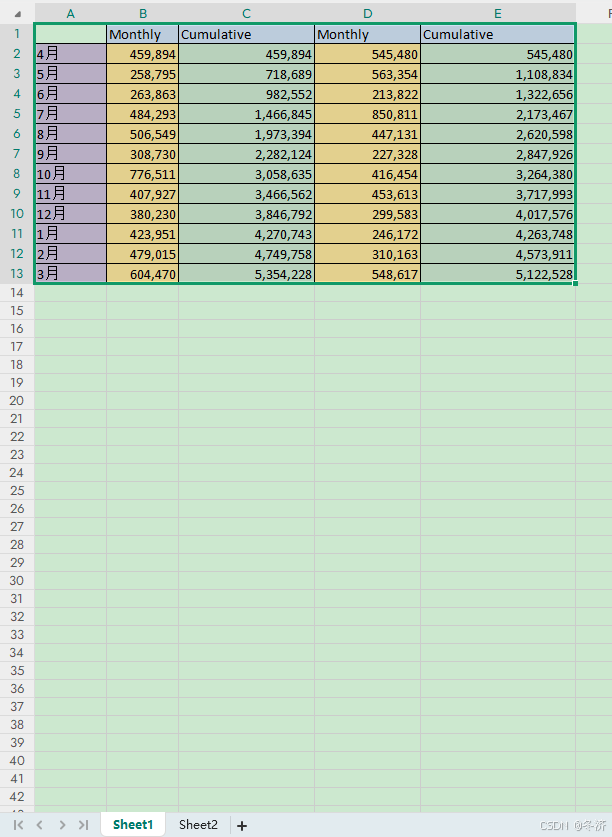
Sheet2:
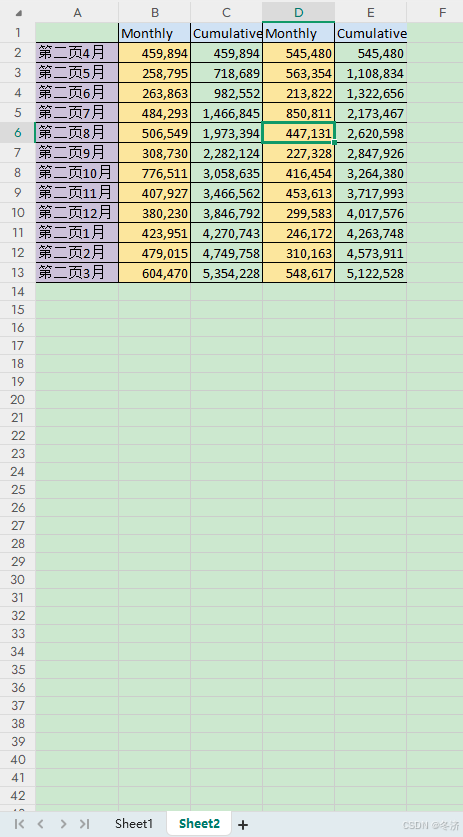
2.3.2 excel2Pdf
将编写好的Excel上传至文件服务器,生成文件链接,此处笔者使用kkfile直接进行上传,生成的链接为:http://127.0.0.1:8012/demo/test.xlsx
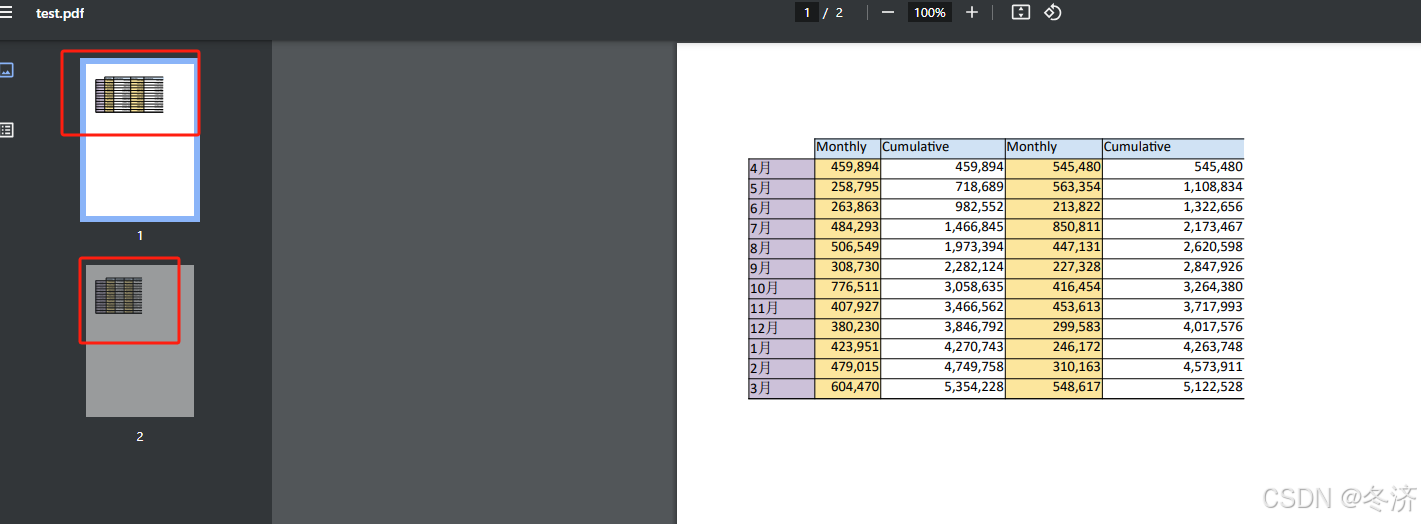
- excel全量转换
浏览器直接访问:http://127.0.0.1:8012/excel2Pdf?fileUrl=http://127.0.0.1:8012/demo/test.xlsx,
此时会跳转至下载页面,下载出一个Pdf,转换后效果如下:
- Excel 指定sheet转换
浏览器直接访问:http://127.0.0.1:8012/excel2Pdf?sheetIndexs=2&fileUrl=http://127.0.0.1:8012/demo/test.xlsx,转换后的效果如下,生成的Excel仅包含了第2页。

2.3.3 excel2PdfByFile
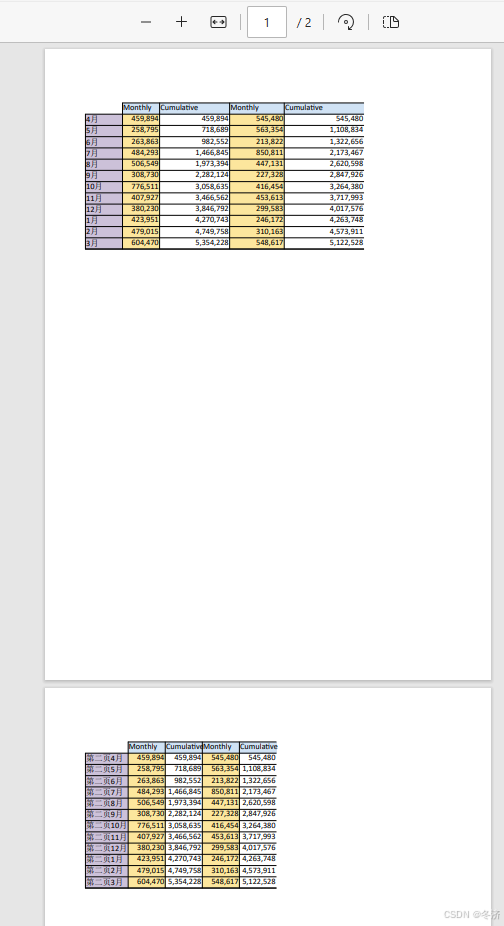
- 针对Excel全量下载
使用Apifox新建接口,按如下方式配置,并点击发送并下载
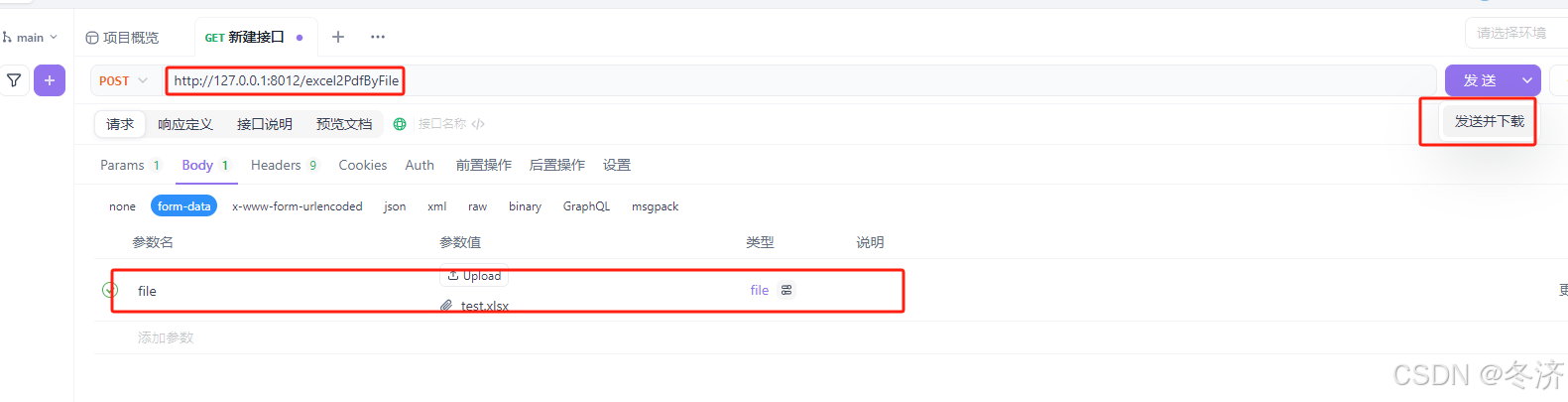
下载后的文件如下,可以看到将Excel中的多个Sheet分别进行转换后,合并到了一个文件中:
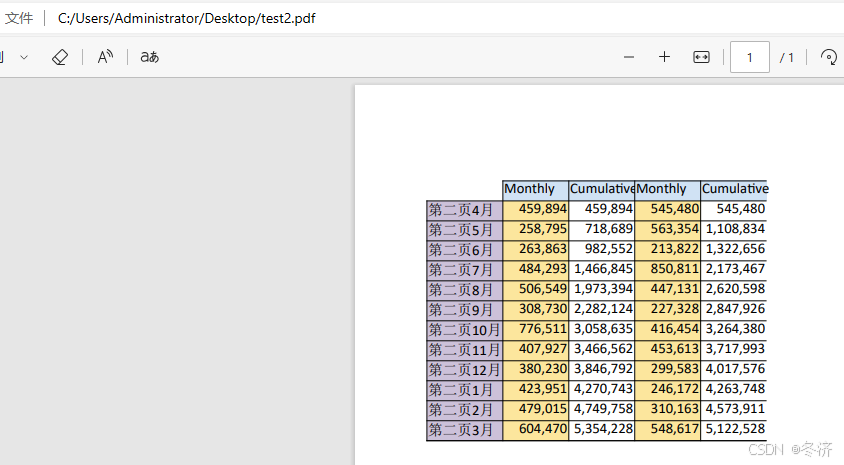
- 转换Excel指定Sheet,如下
使用Apifox新建接口,按如下方式配置,并点击发送并下载

转换后的效果图如下,仅仅转换了我们需要的页码:
2.4 注意
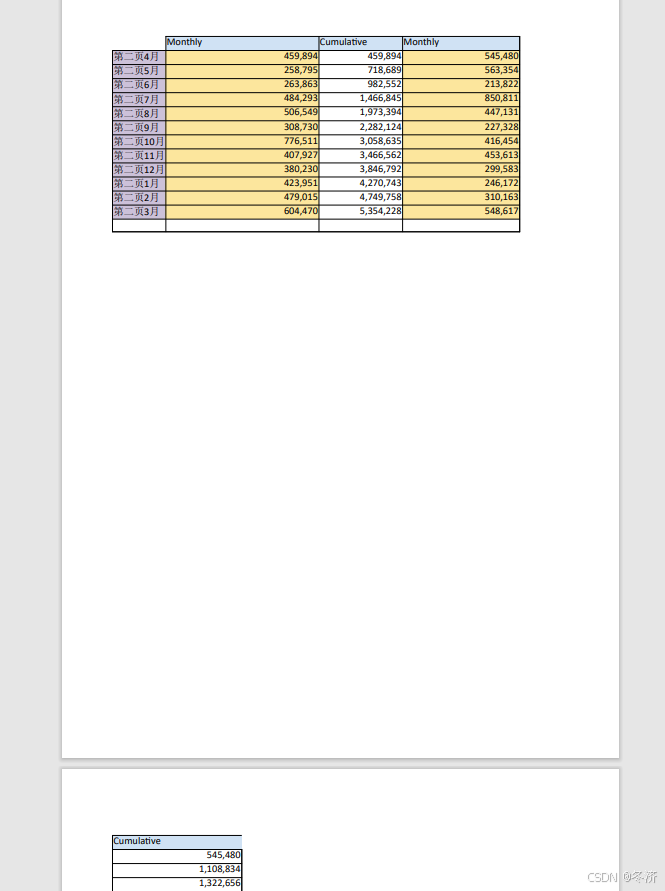
Excel转pdf是按A4纸张大小进行转换的,所以设置模板之前,需要先将Excel的打印区域调整为A4纸大小,如果超出A4纸大小,会换页转换,转换后的效果和我们所需的效果就不太使用。
如下图,excel中,将指定列拉宽后,发现,最后一列超出了打印区域:

针对上述Excel进行转换后,转换效果如下,Excel最终转换后的格式不是我们预想的,所以需要对Excel原始文件进行调整以适配当前转换区域。
3 部署
可参考 【kkFileView二开之源码编译及部署】 文档中,【部署】目录下的方式,根据部署的平台选择合适的方式进行部署。





站长推荐
- U8W/U8W-Mini使用与常见问题解决
 U8W/U8W-Mini使用与常见问题解决
 - QT多线程的5种用法,通过使用线程解决UI主界面的耗时操作代码,防止界面卡死。
 QT多线程的5种用法,通过使用线程解决UI主界面的耗时操作代码,防止界面卡死。...
 - stm32使用HAL库配置串口中断收发数据(保姆级教程)
 stm32使用HAL库配置串口中断收发数据(保姆级教程)
 - 分享几个国内免费的ChatGPT镜像网址(亲测有效)
 分享几个国内免费的ChatGPT镜像网址(亲测有效)
 - Allegro16.6差分等长设置及走线总结
 Allegro16.6差分等长设置及走线总结