您现在的位置是:首页 >技术教程 >小程序 腾讯地图 地点搜索和列表展示网站首页技术教程
小程序 腾讯地图 地点搜索和列表展示
简介小程序 腾讯地图 地点搜索和列表展示
展示:
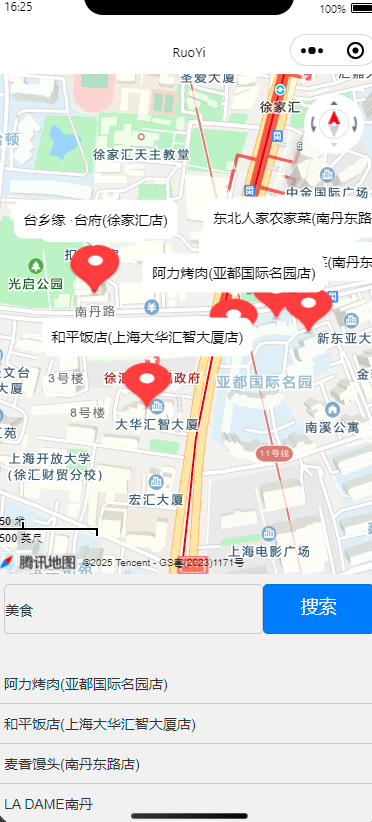
tmap.js:
// 引入腾讯地图SDK
const QQMapWX = require('../../libs/qqmap-wx-jssdk.js');  // 使用 require 代替 import

const qqmapsdk = new QQMapWX({
  key: '*****' // 替换成你的腾讯地图密钥
});

Page({
  data: {
    latitude: null,
    longitude: null,
    markers: [],
    searchQuery: '',
    searchResults: [], // 用于存储搜索的结果列表
  },

  onLoad() {
    // 获取当前位置
    this.getCurrentLocation();
  },

  // 获取当前地理位置
  getCurrentLocation() {
    wx.getLocation({
      type: 'wgs84', // 获取标准的经纬度
      success: (res) => {
        const { latitude, longitude } = res;
        console.log("===latitude=="+latitude)
        this.setData({
          latitude: latitude,
          longitude: longitude,
          markers: [{
            id: 1,
            latitude: latitude,
            longitude: longitude,
            // iconPath: '/static/images/icon/position.png',
            width: 50,
            height: 50,
            title: '当前位置'
          }]
        });
      },
      fail: () => {
        wx.showToast({
          title: '获取位置失败',
          icon: 'none',
        });
      }
    });
  },

  // 搜索地点
  onSearch() {
    const { searchQuery } = this.data;
    if (!searchQuery) {
      wx.showToast({
        title: '请输入地点名称',
        icon: 'none',
      });
      return;
    }

    // 使用腾讯地图 SDK 进行地点搜索
    qqmapsdk.search({
      keyword: searchQuery,
      success: (res) => {
        const searchResults = res.data; // 获取搜索结果数组
        if (searchResults.length > 0) {
          const markers = searchResults.map((result, index) => ({
            id: index + 1, // 每个标注的唯一ID
            latitude: result.location.lat,
            longitude: result.location.lng,
            // iconPath: '/static/images/icon/position.png', // 设置标注图标
            width: 50,
            height: 50,
            title: result.title, // 显示地点名称
            callout: {
              content: result.title,  // 显示在标注旁边的文字
              fontSize: 14,
              color: '#000',
              padding: 10,
              borderRadius: 10,
              display: 'ALWAYS'  // 总是显示文字标注
            }
          }));

          // 更新地图标记
          this.setData({
            markers: markers,
            searchResults: searchResults, // 存储搜索结果
            latitude: this.latitude,
            longitude: this.longitude,
          });

          wx.showToast({
            title: '搜索成功',
            icon: 'success',
          });
        } else {
          wx.showToast({
            title: '未找到相关地点',
            icon: 'none',
          });
        }
      },
      fail: () => {
        wx.showToast({
          title: '未找到相关地点',
          icon: 'none',
        });
      }
    });
  },

  // 更新搜索框内容
  onInputSearch(e) {
    this.setData({
      searchQuery: e.detail.value
    });
  }
});
tmap.wxml:
<view class="container">
  <!-- 地图组件 -->
  <map
    latitude="{{latitude}}"
    longitude="{{longitude}}"
    scale="14"
    markers="{{markers}}"
    show-compass
    show-scale
    enable-3D
    style="width: 100%; height: 500px;">
  </map>

  <!-- 搜索框和按钮 -->
  <view class="search-container">
    <input
      bindinput="onInputSearch"
      value="{{searchQuery}}"
      placeholder="请输入地点名称"
      class="search-input"
    />
    <button bindtap="onSearch" class="search-button">搜索</button>
  </view>

  <!-- 显示搜索结果 -->
  <view class="search-results">
    <block wx:for="{{searchResults}}" wx:key="index">
      <view class="result-item">
        <text>{{item.title}}</text> <!-- 显示地点名称 -->
      </view>
    </block>
  </view>
</view>
tmap.wxss:
/* 页面样式 */
.container {
  display: flex;
  flex-direction: column;
  align-items: center;
}

.search-container {
  display: flex;
  justify-content: space-between;
  padding: 10px;
  width: 100%;
}

.search-input {
  width: 70%;
  height:50px;
  border: 1px solid #ccc;
  border-radius: 5px;
}

.search-button {
  width: 30%;

  background-color: #007bff;
  color: white;
  border: none;
  border-radius: 5px;
  cursor: pointer;
}

.search-button:active {
  background-color: #0056b3;
}

.search-results {
  margin-top: 20px;
  width: 100%;
}

.result-item {
  padding: 10px;
  border-bottom: 1px solid #ccc;
  font-size: 14px;
}
风语者!平时喜欢研究各种技术,目前在从事后端开发工作,热爱生活、热爱工作。




站长推荐
- QT多线程的5种用法,通过使用线程解决UI主界面的耗时操作代码,防止界面卡死。
 QT多线程的5种用法,通过使用线程解决UI主界面的耗时操作代码,防止界面卡死。...
 - U8W/U8W-Mini使用与常见问题解决
 U8W/U8W-Mini使用与常见问题解决
 - stm32使用HAL库配置串口中断收发数据(保姆级教程)
 stm32使用HAL库配置串口中断收发数据(保姆级教程)
 - 分享几个国内免费的ChatGPT镜像网址(亲测有效)
 分享几个国内免费的ChatGPT镜像网址(亲测有效)
 - Allegro16.6差分等长设置及走线总结
 Allegro16.6差分等长设置及走线总结